Showing posts with label Apps. Show all posts

Friday, 14 August 2015

MIME type mismatch issue in SharePoint hosted app

Recently while working on a SharePoint hosted app, I encountered an issue where the App page was not loading correctly. The SharePoint hosted app was hosted on a site collection under the managed path "/sites" as in the following:

http://host-header.com/sites/my_site_coll

The reason I mention the site collection URL is because the issue is specifically related to it.This SP hosted app was a custom ribbon action made available on custom lists and on click of this action, the app page was being displayed in a dialog box. I observed that the UI of the app page was broken and it was apparent that some JavaScript/CSS references were missing.

Error displayed in the IE developer toolbar is shown below.


The SharePoint JavaScript files SP.runtime.JS and init.js were failing to load with the error "MIME 
type mismatch". Using the "Network" tab in the IE developer toolbar, I captured the page load network trace.

Shoot up the IE developer toolbar. Select the Network tab, click Start capturing and Trigger the app from ribbon. Then, let the page load and click "Stop capturing". 


Observe the type of sp.runtime.js. It was returned as "text/html".  My first guess was to check the MIME type values in the IIS website of the SharePoint web application. However, the type configured for JS files was "application/javascript". Also, the type returned for my custom JS files was "application/javascript", so only the JS files from "_layouts" failing to load properly!
The same app was working perfectly in another web application! Notice the URL from where the JS is loaded:

http://apprefix-ID.domain.com/_layouts/15/sp.runtime.js

I tried to hit this URL in the browser. For the web application where the app was working, I got a prompt to save the file. For the web application where the app was not working, I did not get any response. So the path from where the JS was being loaded was incorrect or did not exist. !!

The issue was that the web application, where app was not working, did not have a site collection at the "/"  managed path. Creating this root site collection at the "/" path resolved the issue.


Hope this helps.


Wednesday, 5 August 2015

SharePoint 2013 High trust provider hosted app : Upload large files

Consider a situation where you want to allow a user to upload a large document in your SharePoint application, however the user does not have contribute permission to the Document Library. This can be for several reasons. You don't want the user to see/modify other content and only provide an interface to submit documents. 

We will use the app-only policy of provider hosted apps to upload the documents to the HOST web. This article assumes you understand the basics of the procedure to setup the environment and develop Provider-Hosted apps. If not, here is a technet article to follow.

I have created a provider hosted app with a client web part. The client webpart will be added to a page in the host web that will show a File upload control. The page that the client webpart shows will be deployed to the remote web of the provider hosted app. In this case, it is FileUpload.aspx.


Now, we need to tell the app to use the app-only policy when calling into SharePoint. With the app-only policy, irrespective of what level of permission the user has on the SharePoint site, only the app's permissions will be considered for authorization of the call. So, we set the value in the AppManifest.xml file of the provider hosted app. 

Also, since we are uploading a file in Document Library, the app needs to have the correct permissions on the SharePoint site. This is also set in the AppManifest.xml file.


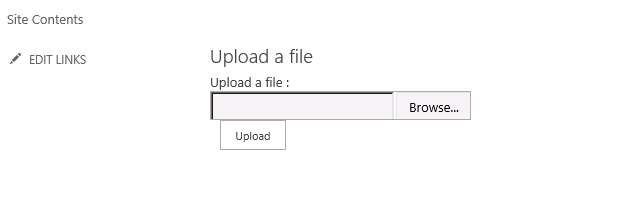
In the FileUpload.aspx page, I have designed a simple UI with a file upload control and a button to upload the document. We write the code to upload the file to a SharePoint Document Library on the event handler of the button click event.

We will use the SharePointContextProvider to get the SharePoint context and theCreateAppOnlyClientContextForSPHost since we are using the app-only policy and uploading the file to the Host web. 


Using the "ContentStream" property, we can upload files of large size in the SP Document Library. Refer to:

https://msdn.microsoft.com/en-us/library/office/dn904536.aspx 

Now I have packaged and deployed my remote web in IIS and uploaded the app to my app catalog. I have also added the app to my SharePoint site. Edit the page and insert the client web part to a page in the Host Web.


And the client webpart shows the upload control and button. Please excuse the alignment of controls. :) 


Try to upload a large document (say about 80 MB, which I tried), and you may run into the below error

"The request filtering module is configured to deny a request that exceeds the request content length" 

This is because the IIS is configured to handle requests of only a specific size and since we are uploading a file of about 80 MB, it fails. We can change that using the web.config file. In the web.config of our remote web application, set the following values:


There is one more setting required. Open IIS then navigate to your remote web site. Click on "Request Filtering" . Click on "Edit Feature Settings" and change the value of "Maximum allowed content length".


Now we are all set. Select a document in the file upload control and hit Upload. Our file is uploaded and is modified by the APP because we are using the App-only policy.